Routes that stay on your permit.

Your oversize permit, pinned for inRoute. Checked pin by pin.

Upload your permit. We turn the permitted route into an inRoute-ready GPX and a one-page driver alert sheet, and email them to you. Built by a working pilot car company for escorts and drivers.

Upload a permitSee pricing

Try it now — 100% free.

Send us your permit, run your first route free, then decide. See how many hours of your life it gives back.

Start my free route

How it works

1

Upload your permit

PDF or phone photos. Multi-state loads are fine: attach every state's permit in one order.
2

We pin it

Every turn on the permit gets a pin placed just past the turn, on the new road, where the lanes are well separated, so inRoute can't snap you to the wrong road. No pin goes off the permitted route.
3

You get the files by email

GPX for inRoute Pro, a driver alert PDF, a KML, and Google Maps links for each leg. Download them from your order page too.

Loading your route into inRoute

  1. Open the GPX file you received by email or text. It won't open for viewing like a normal document — that's normal.
  2. Tap the Share / Forward button and send the GPX file to your inRoute app.
  3. After the route loads in inRoute, tap Go.

Why Navigation Nation

More than a routing service. A routing service gives you a route. We give you your permit route, built and checked for an oversize load.

  • Built straight from your state permit, not a guess from a consumer map.
  • Pins just past each turn, on the right side of divided highways, so the app doesn't loop you into lots or throw U-turns at you.
  • Checked turn by turn against the permit before it's delivered.
  • Follows the permit's rules: curfews, frontage-road requirements and permit-directed turnarounds.
  • Color Driver Alert Sheet with curfews in local time, required calls (railroads, counties, utilities) with phone numbers, clearance and over-height notes, escort requirements, and the route summary in permit order.
  • Ready to load in inRoute. Forward the file and go.
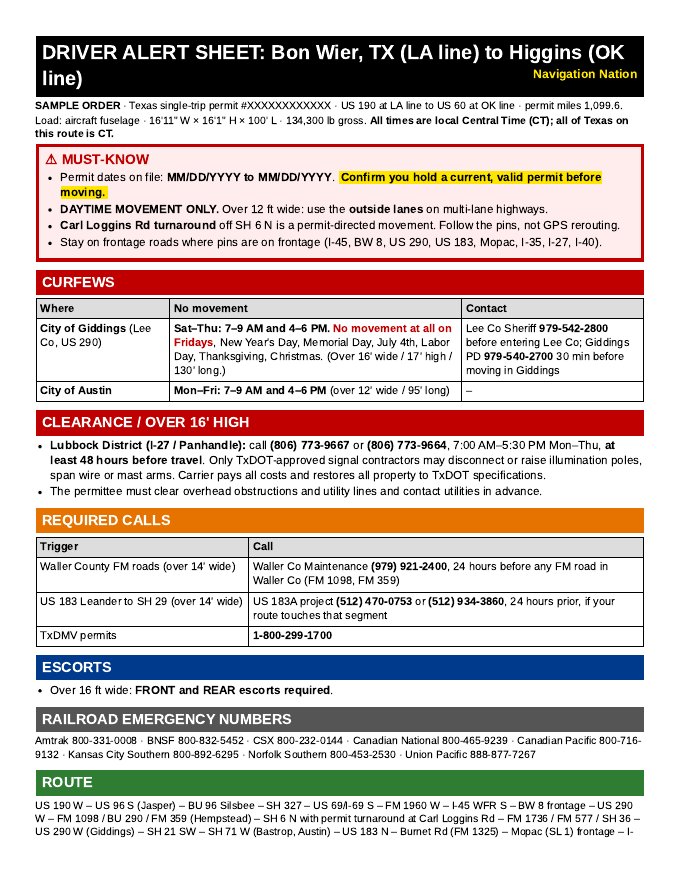
Sample Driver Alert Sheet, page 1
Sample Driver Alert Sheet
Open the full sample (PDF, 2 pages)

Navigation Nation routes are a route-assist tool. Always cross-check against your permit, posted signs and road conditions.

What you get

inRoute-ready GPX

Fewer pins, placed where they count. Less clutter, and fewer chances for inRoute to reroute you off the permit.

Driver alert sheet (PDF)

Curfews by state with their time zones, escort and police requirements, railroad call numbers, posted bridges and centerline crossings, sunrise/sunset for your run, and permit discrepancies such as expired dates or mismatched weights.

KML + Google Maps leg links

Open the route on any phone, or share a leg with the truck or the other escort.

Sample output

From a real 3-state run (TN–AR–TX, GA line to Irving, TX). Carrier, permit numbers and addresses are blacked out.

GPX pins (excerpt)

TN 01 START I-75 N at GA line TN 02 I-40 E/I-75 N before Exit 369 Watt Rd TN 03 I-40 W past Watt Rd turnaround TN 04 TN-58 N Kentucky St Kingston TN 05 US-70 W Race St Kingston TN 07 US-27/TN-61 N Gateway Ave Rockwood TN 08 I-40 W past Rockwood TN 09 I-840 W TN 14 TN-14 S Austin Peay Hwy TN 15 I-40 W Memphis AR 01 AR-440 N AR 02 I-57 S ... (whole route: 3 states, about 100 pins)
DRIVER ALERTS — GA line (I-75 N) to Irving TX (SH-356) — XXXXXXXXXXXX LLC
TN XXXXXXX | AR XXXXXXX | TX XXXXXXXXX

⚠ Permit discrepancy

All permits valid 10/16–10/20. AR and TX expire today. Get extensions before moving (TN valid to 10/22).

Escorts

TN: front + rear, front with height pole. AR: front pole car, front + rear over 130', min 40 mph. TX: front + rear, NO toll roads.

Curfews (local time)

TN: no movement Mon–Fri 7–9am & 4–6pm in Knox/Hamilton (ET) and Davidson/Rutherford/Shelby (CT). AR: daylight only; Little Rock 7–9 AM & 4–6 PM CT…

Sunrise / sunset

Chattanooga 7:51 AM–6:59 PM ET · Memphis 7:10 AM–6:18 PM CT · Irving 7:36 AM–6:48 PM CT

Bridges & railroads

TN 5 mph: I-40 over Hatchie River MM 55–56 … · Railroads: BNSF 800-832-5452, UP 888-877-7267 …

Why not a self-serve permit-scanning app?

Navigation NationSelf-serve scanner apps
Who checks the routeWe check every pin against the permit before it goes outYou check the auto-read route yourself
Pin placementPlaced past each turn on the new road, where lanes are separated, to stop wrong snaps in inRouteUsually wherever the parser put the point
Alert sheetCurfews with time zones, escort rules, bridges, railroads, sunrise/sunset, discrepanciesUsually not included
Made forinRoute Pro, the app escorts already runTheir own app

FAQ

Does it work with inRoute Pro?Yes. Import the GPX into inRoute and the pins load as a route. The KML and Google Maps links work on any phone.
How fast will I get it?Turnaround depends on route length and how many states. Send your permit as early as you can. Your order page shows the status (received, in progress, ready), and we email you when the files are ready.
Do I still need to read my permit?Yes. Always check the files against your permit. The permit as issued is the law, and you are responsible for following it. If something doesn't match, follow the permit and tell us.
Can I send several states in one order?Yes. Upload every state's permit in one order. Pay-per-route orders of 3+ states are $10.
Can I share my plan with friends?No. Routes count against the account, and files only go to the account email. Each escort needs their own account.
Questions?Call Blue Grass Escort at 270-875-5817.